Summer is one of the most financially volatile seasons for small businesses. Whether you are managing seasonal revenue spikes, slower cash flow periods, or preparing for Q3 financial reviews, staying on top of your books during summer months can make the difference between a profitable year and a stressful one.
For small business owners across MENA — particularly in Saudi Arabia and the UAE where summer brings a combination of Hajj season commerce, reduced workforce capacity, and increased operational costs — having the right accounting tool is not optional. It is essential.
QuickBooks is the world's leading small business accounting platform, trusted by millions of business owners to manage invoicing, expenses, cash flow, and tax preparation — all in one place. In this guide, we break down the 3 most impactful ways QuickBooks keeps your business financially healthy during the summer months.
Try QuickBooks free for 30 days →
Way 1 — Real-Time Cash Flow Visibility So You Are Never Caught Off Guard
For small businesses across Saudi Arabia and the UAE, summer is rarely a simple slow season. It is a season of contrasts. Hajj-related commerce in Mecca and Medina creates genuine spikes for hospitality, transport, and retail businesses in certain regions. At the same time, B2B payment cycles stretch out as corporate decision-makers take extended vacations. Utility costs climb as air conditioning runs at full capacity across the Gulf. Staffing adjustments — whether managing vacation schedules, seasonal hires, or workforce reductions — add complexity to the payroll picture.
The danger of managing this complexity in spreadsheets or by memory is significant. Cash flow problems do not announce themselves in advance. They appear suddenly — when you check your account before a supplier payment is due and find the balance is lower than expected. According to QuickBooks research, 61% of small businesses globally struggle with cash flow — and summer is one of the highest-risk periods for shortfalls.
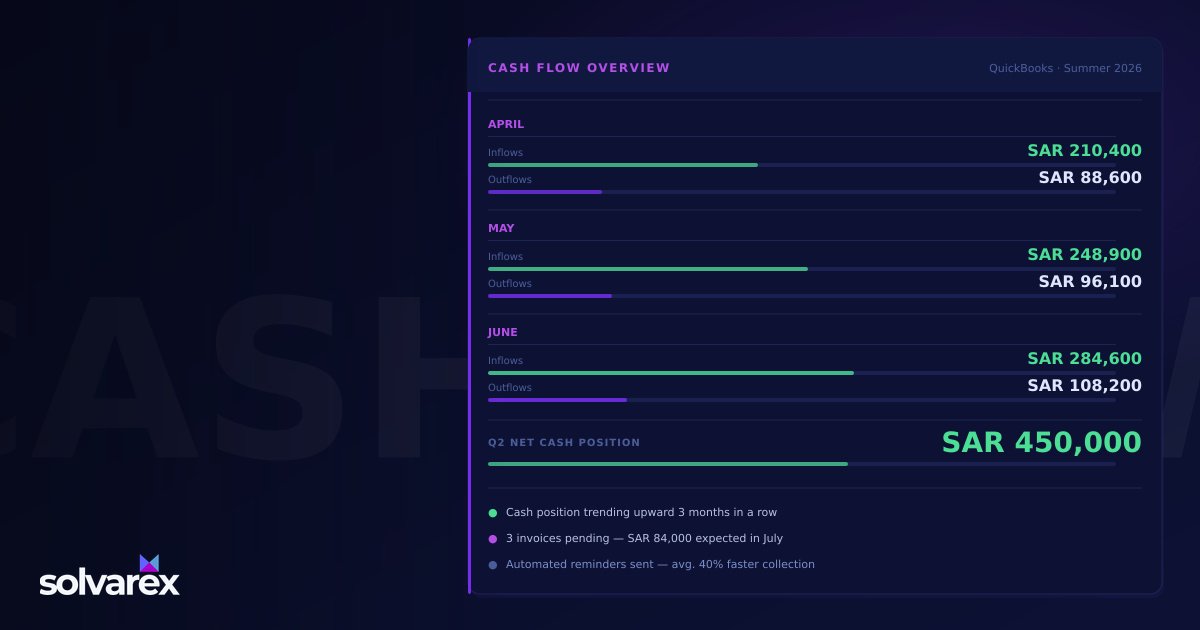
QuickBooks addresses this directly with a real-time cash flow dashboard that shows your income, expenses, and net position at a glance. Every connected bank account and credit card updates automatically, giving you a live picture of exactly where you stand without manual data entry or reconciliation headaches.
The cash flow forecasting feature takes this further. Instead of showing you only where you are today, it projects your expected cash position 30, 60, and 90 days ahead based on your current income, recurring expenses, outstanding invoices, and scheduled bills. For a small business owner planning through July, August, and September, the ability to see potential cash shortfalls before they arrive is genuinely transformative. You can accelerate collections on outstanding invoices, arrange a short-term credit line, or defer non-essential expenses — all before the shortfall becomes a crisis.
QuickBooks also sends proactive cash flow alerts. You set the trigger threshold — say, when your projected balance drops below a certain amount — and the platform notifies you in advance. For businesses that have experienced the stress of an unexpected overdraft or a missed supplier payment, this alert system alone is worth the subscription fee.
For MENA businesses specifically, the automatic bank feed synchronization is particularly valuable. Saudi Riyal and UAE Dirham accounts connect directly, with transactions appearing categorized and reconciled within 24 hours. Every expense — from supplier invoices to telecom bills to co-working space fees — appears in your QuickBooks dashboard as it posts, giving you an accurate, real-time view of your cash position across accounts and currencies.
💡 QuickBooks Tip: Use the Cash Flow Planner to map out your expected income and expenses for July–September before the summer begins. Knowing your cash position 90 days ahead lets you make proactive decisions — not reactive ones. If the forecast shows a shortfall in August, you have time to accelerate collections in June, arrange a short-term credit line, or defer non-essential expenses before the shortfall becomes a crisis.
See QuickBooks Cash Flow tools →
Way 2 — Automated Invoicing That Gets You Paid Faster
Late payments are the single most common financial pain point for small businesses in MENA. And summer makes the problem worse. Corporate clients travel. Finance teams shrink. Approval chains slow down as the people who authorize payments are on vacation leave. For a small business waiting on a significant invoice, these summer delays can create real cash flow stress — even when the underlying business is healthy and the client relationship is strong.
QuickBooks automated invoicing system is designed to eliminate the friction that causes late payments, both on the client side and on the follow-up side.
Creating a professional invoice in QuickBooks takes under five minutes. The platform pulls in client details, line items, applicable tax rates — including 15% VAT for Saudi Arabia and 5% VAT for the UAE — and payment terms automatically. The resulting invoice looks polished and professional, not a hand-formatted email or a Word document.
Once the invoice is sent, QuickBooks tracks it automatically. You can see the moment a client opens the email, when they view the invoice attachment, and whether payment has been initiated. This visibility eliminates the guesswork of payment follow-up. You know exactly which invoices need attention and which are in process.
Automated payment reminders are where QuickBooks invoicing becomes particularly powerful for summer collections. Set your reminder schedule once — three days before the due date, on the due date itself, and seven days after — and QuickBooks handles every follow-up automatically, without any action required from you or your team. Businesses using this system report reductions in late payments of up to 40% without a single additional manual follow-up.
For clients on retainers or recurring service agreements, recurring invoices eliminate the manual step entirely. Configure the invoice once, set the billing frequency, and QuickBooks generates and sends it on schedule — monthly, quarterly, or whatever your arrangement requires. Summer trips and reduced staffing do not interrupt your billing cycle.
Clients can pay directly through the invoice using a credit card, debit card, or bank transfer. This is a meaningful advantage in MENA, where enterprise clients increasingly expect the convenience of online payment options. Reducing the friction in the payment process directly reduces the average time between invoice date and cash received.
For Saudi businesses working with government or large enterprise clients, QuickBooks bilingual invoicing capability is worth noting. Invoices can be generated in both Arabic and English — important for dealings with clients who require Arabic-language documentation as part of their accounts payable process. Combined with ZATCA e-invoicing compliance features, QuickBooks helps Saudi small businesses meet their regulatory obligations while maintaining professional presentation.
💡 QuickBooks Tip: Before summer starts, set up automatic payment reminders for all outstanding invoices — 3 days before due, on the due date, and 7 days after. This alone can reduce late payments by up to 40% without a single manual follow-up from your team. Set it once in June and let QuickBooks manage your receivables through the entire summer season.
Source: ActiveCampaign platform data and EmailTooltester 2024 deliverability report
Way 3 — Tax-Ready Books All Summer So Q3 and Q4 Are Not a Nightmare
Here is an honest picture of how most small business owners experience tax season: in November and December, they spend weeks reconstructing the financial history of the previous 12 months. Receipts sit uncategorized in email inboxes. Bank transactions do not match the accounting records. VAT returns require manual calculation because the books have not been maintained throughout the year. The accountant charges premium rates because the catch-up work is extensive. Deductions are missed because the documentation was never properly filed.
QuickBooks eliminates this scenario by keeping your books tax-ready throughout the year — automatically, as you operate — so that summer backlog never builds up in the first place.
Automatic expense categorization is the foundation. Every transaction that comes through the bank feed gets tagged to the appropriate category: software subscriptions to technology expenses, supplier payments to cost of goods, office supplies to administrative expenses. QuickBooks learns from your past categorization patterns and applies intelligent defaults to new transactions. Over time, the manual categorization work approaches zero.
Receipt capture via the QuickBooks mobile app removes the paper trail problem entirely. Photograph a receipt at a restaurant, a hardware store, or a supplier meeting. QuickBooks reads the amount, date, and vendor through OCR, creates a transaction entry, and attaches the image. The receipt is filed. The expense is categorized. No more end-of-year receipt archaeology.
For VAT-registered businesses in Saudi Arabia, QuickBooks tracks VAT at 15% on every applicable transaction automatically. For UAE businesses, it tracks at 5%. Input VAT and output VAT are maintained separately, and QuickBooks generates the VAT summary report needed for your GAZT or FTA return — already calculated, correctly categorized, ready to submit. The time this saves for small business owners who previously calculated VAT returns manually each quarter is considerable.
ZATCA compliance is increasingly critical for Saudi businesses as Phase 2 e-invoicing requirements roll out. QuickBooks organized transaction records and complete documentation of all sales and purchases provide the audit trail that ZATCA compliance requires — without any additional effort on your part.
The downstream benefit of well-maintained books is the quality of your accounting relationship. When your records are clean and current, your accountant shifts from data organization to financial advising. They spend less time untangling records and more time helping you make better business decisions. Pair this with business intelligence and reporting tools and your financial data becomes a genuine strategic asset, not just a compliance requirement.
💡 QuickBooks Tip: Use the summer months — July and August — to run a mid-year financial review. Pull your QuickBooks Profit and Loss report for January through June, compare it to your annual targets, and adjust your Q3 and Q4 plan before it is too late to course-correct. A focused 30-minute review in August can prevent significant year-end surprises.
Getting Started with QuickBooks — What Small Business Owners Need to Know
QuickBooks Online offers four plan tiers designed to match the size and complexity of your business:
Simple Start is designed for solopreneurs and freelancers running their business alone. Income and expense tracking, invoicing, VAT support, and single-user access — all the fundamentals.
Essentials adds multi-user access for up to three users, bill management, and time tracking. Ideal for small teams of two or three people who need collaborative access to the financial records.
Plus introduces inventory tracking and project profitability. Designed for growing SMEs managing physical products or client projects that require cost tracking at the project level. Compatible with CRM and business automation deployments that feed project data into financial reporting.
Advanced is built for scaling businesses that need advanced reporting, custom workflows, and batch invoicing. The right choice when operational sophistication demands matching financial visibility.
Setup takes less than a full business day for most small businesses. Connect your bank accounts, configure your chart of accounts or use the QuickBooks defaults, invite your accountant or bookkeeper, and you are operational. QuickBooks integrates with the payment gateways, payroll platforms — including services that handle payroll management for MENA teams — and the CRM systems your business already uses.
The QuickBooks mobile app allows you to manage invoices, approve expenses, check your cash position, and capture receipts from anywhere — important whether you are traveling for business in the summer, working remotely, or simply need to check your numbers between meetings.
The free trial provides full access to all features for 30 days. No credit card required to start. Most small businesses are fully operational on QuickBooks within their first day.
Start your free 30-day QuickBooks trial →
Is QuickBooks Right for Your MENA Small Business?
QuickBooks Online is available globally and works for businesses operating in Saudi Arabia, the UAE, Jordan, Egypt, and across the wider MENA region. Multi-currency support covers Saudi Riyals (SAR), UAE Dirhams (AED), US Dollars (USD), and other major currencies — important for businesses that invoice internationally or manage expenses across currencies.
The platform is well-suited for a range of MENA business types:
Service businesses — consulting firms, agencies, professional services — where invoicing, time tracking, and expense management form the core financial workflows. QuickBooks handles the complete revenue cycle from estimate through invoice to payment receipt.
Trading companies managing physical goods, where inventory tracking (available in QuickBooks Plus) and accurate cost-of-goods calculations are essential to understanding true profitability.
E-commerce businesses operating across GCC markets, where multi-currency invoicing and volume billing capabilities matter for both B2B and consumer-facing operations.
Agencies and creative firms managing multiple client projects simultaneously, where project-level profitability reporting distinguishes profitable engagements from margin-draining ones.
Solvarex uses and recommends QuickBooks for clients across Saudi Arabia, the UAE, and Jordan. As part of our curated Solvarex technology partner ecosystem, QuickBooks sits at the foundation of the financial management layer — the single source of financial truth that every other business tool ultimately reports to.
Summer Is the Right Time to Get Your Finances in Order
Summer does not have to be the season where your finances slip through the cracks. With QuickBooks managing your cash flow visibility, automating your invoicing, and keeping your books tax-ready, you can focus on running your business while your financial foundation takes care of itself.
The small businesses that come out of summer strongest are the ones that went in prepared. QuickBooks is the tool that makes that preparation effortless — and the 30-day free trial means you can be fully set up and operational before July without any financial commitment.
Related Articles
QuickBooks Online 90% Off: Why Right Now Is the Best Time for Small Businesses to Get Started
QuickBooks Online is offering 90% off for new subscribers — but prices are rising soon. Here's why small businesses in MENA should act now.

How AI Is Transforming Global Hiring in 2026 — And Why Deel Is the Compliance Layer Every Team Needs
AI is reshaping how companies hire globally in 2026. Learn how Deel provides the compliance and payroll infrastructure to make it work at scale.
Gusto: The Modern Payroll Platform Powering US-Registered Companies and Their MENA-Based Founders
For MENA founders operating US LLCs or C-Corps — and the growing number of Saudi and Emirati companies expanding into the US market — managing American payroll, benefits, and tax compliance has long been painful. Gusto solves this elegantly for 500,000+ businesses, and increasingly for MENA companies with US operations. Here's why Gusto matters and how to use it strategically.
Enjoyed this article? Get more insights in our LinkedIn newsletter.
Subscribe on LinkedInReady to implement this for your business?
Book a free 30-minute consultation with our team.