July is here, and 2026 is already more than halfway over. For small business owners across MENA — whether you're running a trading company in Riyadh, a consultancy in Dubai, or a services firm in Amman — this is one of the most important moments on the financial calendar.
The decisions you make right now about how you manage your money can determine how your Q3 and Q4 unfold. Most business owners spend January setting goals and December panicking. July is the moment in between — the one most people waste.
The businesses that use this window to review, reset, and reorganize their finances consistently outperform those that don't. Here is how QuickBooks helps you finish 2026 strong.
Why the Back Half of the Year Is Make-or-Break for Small Businesses
July marks more than a calendar midpoint. It marks the beginning of your last real opportunity to shape how the year ends. By now, you have six full months of data — six months of revenue, expenses, client patterns, and cash flow — that tell a clear story about where your business actually stands versus where you thought it would be.
Q3 and Q4 are typically the highest-revenue quarters for most B2B businesses in MENA. Corporate procurement cycles accelerate as organizations push to spend remaining budgets before year-end. Government and enterprise projects — many tied to Saudi Vision 2030 — enter implementation phases in H2 after planning in H1. The post-summer surge in September and October is real, and businesses that enter it organized consistently capture more of it than those that do not.
Summer in MENA also brings unique commercial dynamics. Hajj season commerce creates genuine activity spikes for hospitality, transport, and retail businesses. Post-Hajj, corporate activity resumes with urgency as decision-makers return from leave and push to close the quarter.
There is also a practical truth nobody talks about in July: the financial habits and systems you build now directly determine how stressful tax season will be in December. Every transaction not categorized today is an hour of work in November. Every invoice not tracked today is a follow-up you will forget. Every missed deduction is money your accountant cannot recover after the fact.
Two types of business owners emerge from every financial year: those who react to their finances — discovering problems after they happen — and those who manage them, seeing issues before they become crises. QuickBooks is what puts you firmly in the second category.
Step 1 — Get a Real-Time Snapshot of Where You Stand
Before you can plan for the back half of 2026, you need an honest picture of the first half. This sounds obvious. What is less obvious is that most business owners in MENA are making H2 decisions based on incomplete or outdated financial data.
They know their bank balance. They have a rough sense of their biggest clients and largest expenses. But they do not have a clear picture of their actual profit margin, their revenue trend month by month, or the ratio of their fastest-growing expenses to their revenue growth. QuickBooks gives you all of this in minutes — without needing an accountant.
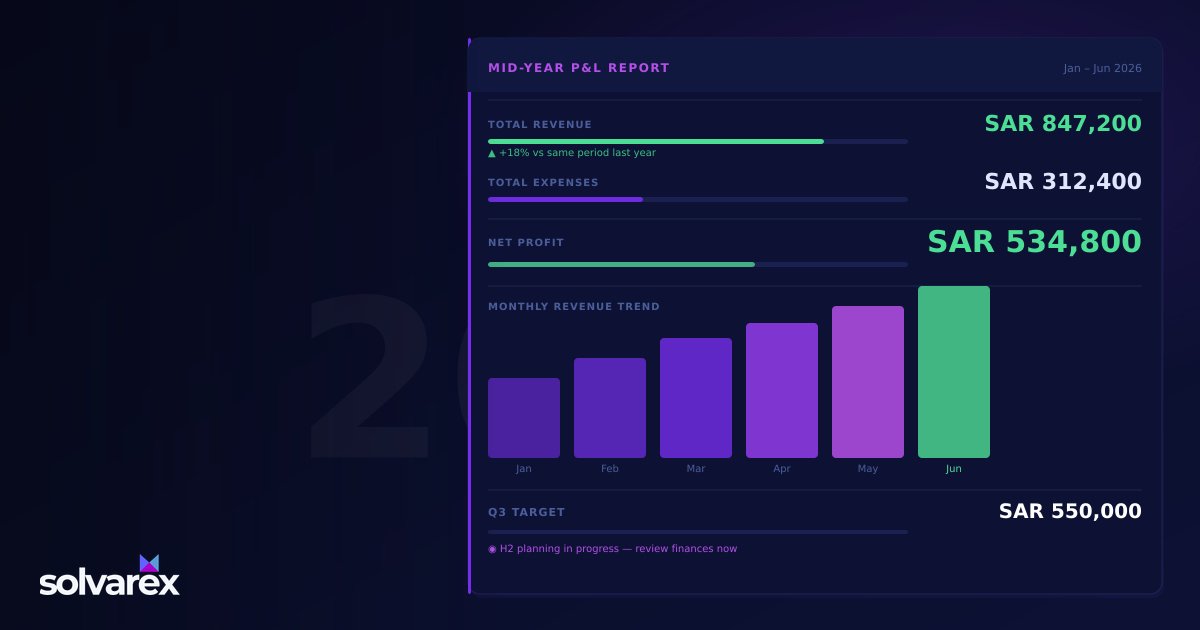
The core tool is the mid-year profit and loss report. In QuickBooks, this takes one click to generate. The P&L report shows you:
- Total revenue from January through June
- Total expenses broken down by category — rent, payroll, software, marketing, logistics
- Gross profit margin — what percentage of revenue you keep after direct costs
- Net profit or loss — your actual bottom line after all expenses
- Month-by-month revenue trends — whether you are growing, plateauing, or declining
- Biggest expense categories — which costs have grown the most relative to revenue
Reading your mid-year P&L correctly means asking three questions: Is revenue tracking ahead of or behind your annual target? Which expense categories grew faster than revenue? Where can you tighten spending before H2 starts?
Beyond the P&L, QuickBooks generates two other critical reports automatically. The balance sheet shows what you own versus what you owe — a snapshot of your financial position that any bank or investor will request. The cash flow statement shows whether cash is trending upward or downward, and where the biggest inflows and outflows are occurring.
For Saudi businesses, these reports serve double duty: they provide the documentation required for ZATCA compliance and e-invoicing records. For UAE businesses, they form the basis of VAT return submissions. QuickBooks formats all of this automatically — accountant-ready, compliance-ready, and shareable in one click.
Paired with strong business intelligence and financial reporting practices, this mid-year snapshot becomes a genuine strategic tool — not just a compliance exercise.
💡 QuickBooks Tip: Run your mid-year P&L report right now — before doing anything else. The numbers will make every recommendation below more specific and actionable for your business.
Step 2 — Stop Chasing Invoices During Your Busiest Season
Summer and early Q3 bring more projects, more clients, and more moving parts to most MENA businesses. What they also bring is the peak risk period for payment delays.
Most small business owners in MENA still send invoices manually — formatted in Word or Excel, emailed to the client, and tracked in a spreadsheet or by memory. Follow-ups happen when the owner remembers to send them, which often means they happen late, or not at all. UAE SMEs lose significant revenue every year to late payments — not because clients are unwilling to pay, but because the follow-up system is too inconsistent to prompt them reliably.
QuickBooks replaces this entire manual process with automation that runs while you are on summer travel, in client meetings, or sleeping.
Creating an invoice in QuickBooks takes under five minutes. Client details, line items, VAT rates (15% for Saudi Arabia, 5% for UAE), and payment terms populate automatically from your contacts and product catalog. The resulting invoice is professional, branded, and ready to send in one click.
Once sent, QuickBooks tracks every invoice automatically. You can see the moment a client opens the invoice email, when they view the attachment, and whether payment has been initiated. This visibility eliminates most unnecessary follow-up calls — you know exactly which invoices need attention and which are in process.
Automated payment reminders are where the system becomes genuinely powerful. Set your reminder schedule once — three days before the due date, on the due date itself, and seven days after — and QuickBooks manages every follow-up automatically. Businesses using automated reminders reduce late payments by up to 40% without a single additional manual call.
For clients on retainers or recurring service agreements, recurring invoices eliminate the monthly manual step entirely. You configure the invoice once, set the billing frequency, and QuickBooks generates and sends it on schedule — whether you are in the office or anywhere else.
For MENA businesses working with bilingual clients or government entities, QuickBooks supports Arabic and English invoices — important for Saudi businesses dealing with enterprise or government accounts payable teams who require Arabic-language documentation. Combined with ZATCA e-invoicing support, this is closely aligned with broader CRM and business automation practice — automating client-facing workflows to reduce the time your team spends on administration.
Start your QuickBooks free trial →
💡 QuickBooks Tip: Before Q3 starts, set up automatic payment reminders for all outstanding invoices — 3 days before due, on the due date, and 7 days after. This single change can reduce late payments by up to 40% without a single manual follow-up call.
Source: ActiveCampaign platform data and EmailTooltester 2024 deliverability report
Step 3 — Keep Your Books Clean Now So Tax Time Is Not a Nightmare Later
Here is an honest picture of what most small business owners in MENA experience in November and December: weeks of reconstructing six months of transactions that were never properly categorized. Receipts sitting uncategorized in email inboxes. Bank statements that do not match accounting records. VAT returns requiring manual calculation because the books were not maintained throughout the year.
The accountant charges higher rates because the catch-up work is extensive. Deductions are missed because documentation was never properly filed. The entire process creates weeks of financial stress at the exact moment you should be closing the year with momentum.
QuickBooks eliminates this entirely through automated bookkeeping that runs year-round.
Every bank account and credit card you connect synchronizes automatically. Transactions are imported and categorized as they occur — no manual entry, no batch processing. QuickBooks learns your categorization patterns and applies them consistently, so common expenses (utilities, software subscriptions, supplier payments) are always correctly assigned.
The mobile receipt capture feature handles the paper trail automatically. Photograph a receipt the moment you receive it, and QuickBooks logs the expense, reads the amount and vendor, and attaches the image to the transaction. No more end-of-year receipt archaeology.
For VAT compliance, QuickBooks calculates and tracks VAT automatically on every transaction. Saudi businesses under the 15% VAT regime see every taxable transaction correctly treated in real time. UAE businesses under the 5% regime get the same automatic calculation. Quarterly VAT reports — the kind submitted to ZATCA and the Federal Tax Authority — generate in one click, formatted correctly and audit-ready.
For ZATCA e-invoicing compliance specifically, QuickBooks maintains the organized transaction records required by the Phase 2 mandate — including structured data fields, QR codes, and the XML formats ZATCA expects.
The practical impact of year-round automated bookkeeping is significant: lower accounting fees because your accountant spends time advising instead of organizing; accurate tax position at any moment so you can make decisions with confidence; audit-ready books always available because the work is done continuously, not in a panic at year-end.
For a deeper look at cash flow management through summer specifically, our QuickBooks summer finance guide covers the seasonal dynamics in detail.
Start your QuickBooks free trial today →
💡 QuickBooks Tip: Use July to do a mid-year bookkeeping review. Open QuickBooks, check that all transactions from January–June are correctly categorized, and reconcile your bank accounts. Two hours now saves two weeks in December.
Bonus — What Else to Do This July to Set Up a Strong H2
Getting your books organized is the foundation. These four additional actions will make your H2 significantly stronger:
Review your pricing. Have costs increased in 2026 but your prices stayed the same? QuickBooks' P&L report shows margin compression clearly — if expenses grew 15% but revenue grew 8%, you are getting less profitable with every new client. July, before Q3 projects start, is the ideal moment to adjust pricing. Conversations are easier before the new project cycle than during it.
Audit your subscriptions and recurring expenses. Most growing businesses accumulate 20–30% of monthly expenses in software subscriptions and service contracts that are underused or no longer necessary. QuickBooks' expense view shows every recurring charge in one place, with the vendor, amount, and frequency clearly visible. Run this audit in July and cancel anything that does not justify its cost before it auto-renews in H2.
Set Q3 and Q4 revenue targets. Use your H1 actual revenue as the baseline, not last year's projections. Set specific SAR or AED targets for each remaining quarter and record them in QuickBooks' business goals feature. The platform tracks your progress against these targets automatically, giving you a running view of whether H2 is on track throughout the quarter.
Prepare your team for H2. Share the mid-year P&L with key team members and align on the top three revenue priorities for Q3. QuickBooks supports multi-user access so finance, sales, and operations can all view the same live financial data. Shared visibility creates shared accountability — and accountability is what drives the actions that finish years strong.
Getting Started With QuickBooks for Your MENA Business
QuickBooks Online works across all MENA markets — Saudi Arabia, UAE, Jordan, Egypt, and beyond. The platform supports multi-currency transactions in SAR, AED, USD, and other major currencies, with automatic exchange rate updates.
Setup is straightforward for most businesses. Connect your bank accounts, import your client and vendor contacts, configure your VAT settings for your market, and you are operational. Most businesses are fully up and running within a single day. The mobile app lets you manage invoices, review reports, capture receipts, and check your cash position from anywhere — particularly useful for owners who travel during summer.
QuickBooks offers a free 30-day trial with full access to all features — no credit card required to start. Plans scale with your business size, from sole traders to multi-employee SMEs, with pricing that adjusts to your needs. Our Solvarex technology partners page covers the software ecosystem we support across MENA — QuickBooks is among our most recommended platforms for regional businesses.
The Second Half of 2026 Is Yours to Win
The second half of 2026 is yours — but only if you start it with a clear picture of your finances.
Every month you wait to organize your books is another month of decisions made without complete information. Every invoice that goes without an automated reminder is money left on the table. Every uncategorized transaction today is an hour of stress in December.
QuickBooks removes all of this from your plate — so you can spend July and August building your business, not untangling your finances. The mid-year review takes a few hours. The automated systems you put in place run for the rest of the year without additional effort.
Frequently Asked Questions
Is QuickBooks available for businesses in Saudi Arabia and UAE? Yes. QuickBooks Online is available globally including Saudi Arabia and UAE with multi-currency support for SAR and AED, and VAT tracking for both markets.
How does QuickBooks help with mid-year financial review? QuickBooks generates a profit and loss report, balance sheet, and cash flow statement in one click — giving you a complete mid-year financial snapshot without needing an accountant.
Can QuickBooks help reduce late payments from clients? Yes. QuickBooks automated invoicing sends payment reminders before and after due dates automatically, reducing late payments by up to 40% without manual follow-up.
Does QuickBooks support VAT for Saudi Arabia? Yes. QuickBooks automatically calculates and tracks VAT at 15% for Saudi Arabia on every transaction, and generates quarterly VAT reports in one click.
Is there a free trial for QuickBooks? Yes. QuickBooks offers a free 30-day trial with full access to all features — no credit card required to start.
Related Articles
Gusto: The Modern Payroll Platform Powering US-Registered Companies and Their MENA-Based Founders
For MENA founders operating US LLCs or C-Corps — and the growing number of Saudi and Emirati companies expanding into the US market — managing American payroll, benefits, and tax compliance has long been painful. Gusto solves this elegantly for 500,000+ businesses, and increasingly for MENA companies with US operations. Here's why Gusto matters and how to use it strategically.
Qoyod: The Saudi-Made Accounting Platform Built for ZATCA-Compliant Businesses
For businesses operating in Saudi Arabia, accounting software is no longer just a record-keeping tool — it is a regulatory necessity. With ZATCA's e-invoicing mandate fully in effect, every business needs an accounting platform that handles compliance natively. Qoyod is the platform built for exactly that — by Saudis, for the Saudi market. Here's why it matters.

Enjoy Your Summer — Let QuickBooks Online Keep Your US Business Finances in Order
Summer invites a slower pace — vacations, travel, and a well-earned breather. But for founders running US-registered entities, finances don't take a holiday. Bookkeeping, invoicing, and tax-readiness still need attention. The good news? QuickBooks Online lets you keep your financial house in order on autopilot — so you can soak up every moment of the season without falling behind.
Enjoyed this article? Get more insights in our LinkedIn newsletter.
Subscribe on LinkedInReady to implement this for your business?
Book a free 30-minute consultation with our team.